
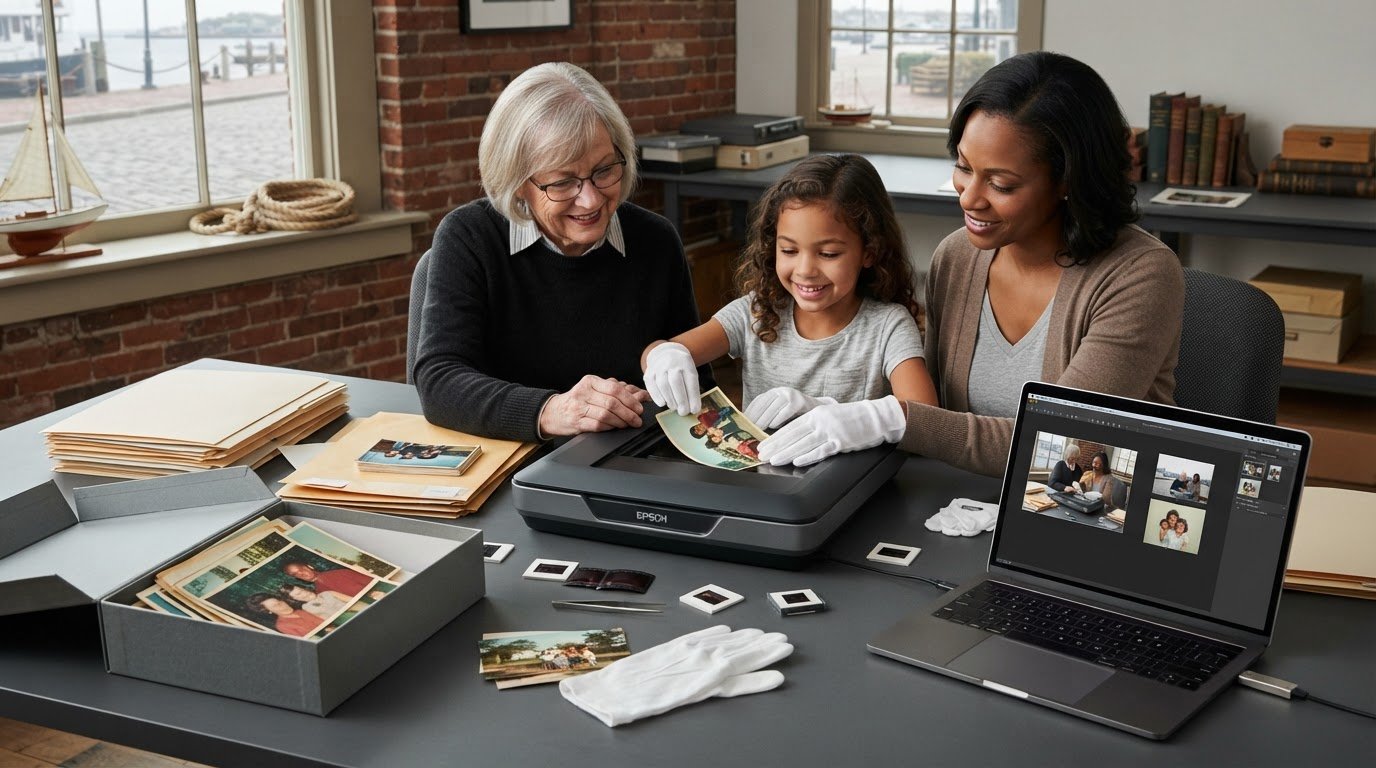
To digitize old family photos in Newburyport, local scanning can turn prints and other originals into digital files without mailing them away. Fragile or curled photographs need careful handling, and the right approach depends on each original’s condition and format.
Mail-in services can be convenient, but keeping family photographs close while they’re prepared and scanned may feel more reassuring. This article explains how local digitizing can handle prints and other originals, what helps protect delicate images, and how digital files can be delivered by USB, cloud, or CD. You’ll also learn what to consider when preparing a family collection, so you can make a practical plan for preserving the images and keeping the originals safe.
Key Takeaways
- Identify whether your collection includes prints, slides, negatives, transparencies, or documents so each original can be prepared for an appropriate scan.
- Avoid pressing curled or warped photographs flat under a scanner lid, since the image layer can crack or flake.
- Sort photos into meaningful groups and preserve the originals in archival, acid-free folders or boxes after digitizing.
- Choose a file delivery method that suits how you’ll view and share the images, then keep backup copies in separate places.
- For Newburyport collections, plan how to transport and organize the originals locally, and consider BetterLight scanning when precise digital capture is important.
Scanning prints, slides, negatives, transparencies, and documents
Family collections may include paper prints, film, and documents, so identify each format before choosing a scanning method. For Newburyport families, the format and condition help determine how originals should be prepared and captured.
Supported Photo and Document Formats
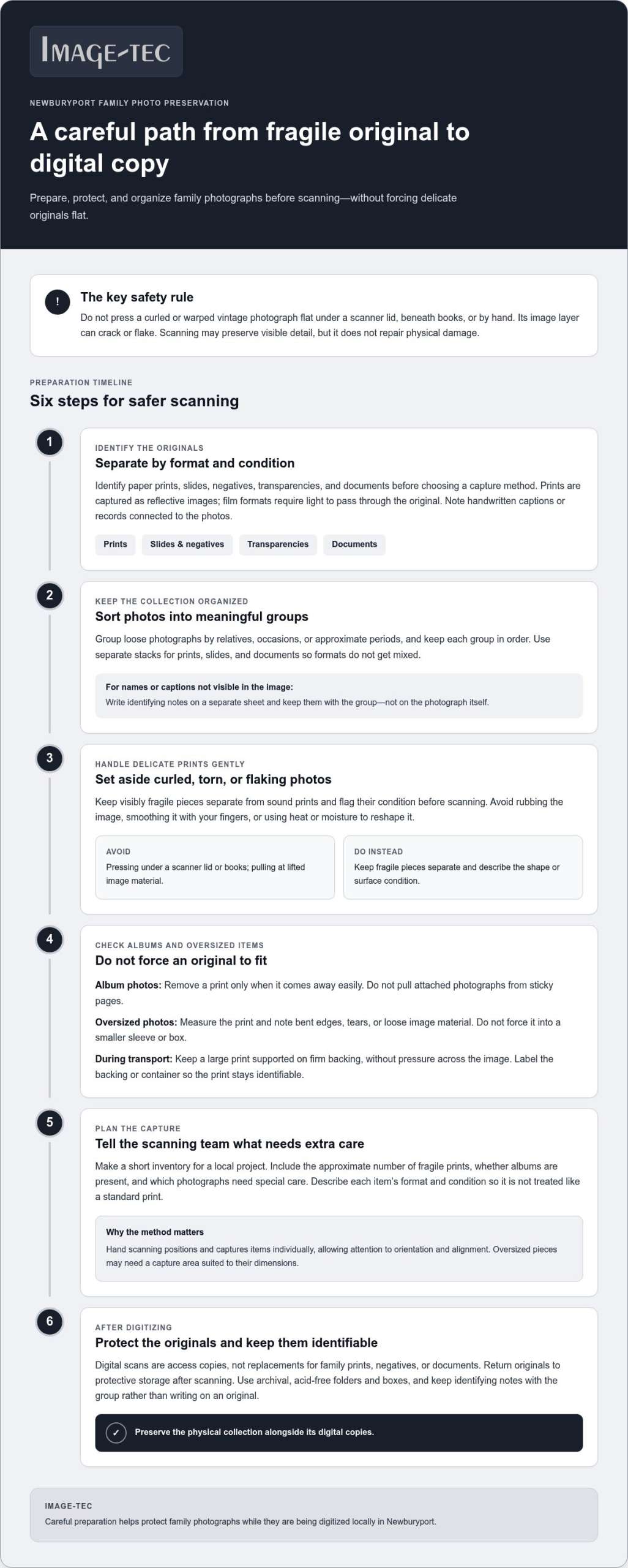
Prints, slides, negatives, transparencies, and documents each need an appropriate capture setup. Prints are scanned as reflective images, while film formats require light to pass through the original. Before sorting, separate the formats and note whether documents include handwritten captions or records connected to the photographs.
Mail-in photo scanning services for U.S. customers may use prepaid boxes, but packing and image sizes affect how many originals fit. One prepaid photo box can accommodate about 1,800 standard photographs; a prepaid slide box can hold about 540 standard 35mm slides. These are estimates, not fixed counts for every collection.
Full slide-carousel scanning is available for up to 140 slides at 4,000 DPI. That gives families with a carousel a defined way to convert a group of slides, while loose slides and other film formats need a process suited to their arrangement. Select the service based on the originals you have, not just the number of items.
Scanning Quality and Hand Scanning
Scanning quality depends on the original, capture resolution, and how carefully each image is positioned. For example, full carousel scanning at 4,000 DPI creates detailed digital captures of slides. For prints, compare a sample image at the intended screen or print size; fine lettering, facial detail, and fading reveal whether the scan preserves useful information.
With hand scanning, an operator positions and captures items individually instead of processing a batch in one automated pass. This allows careful attention to orientation and alignment, especially for mixed prints and documents. Before a larger order, choose a representative sample, such as a faded print, a clear photograph, and a handwritten document.
Care for Delicate and Vintage Formats
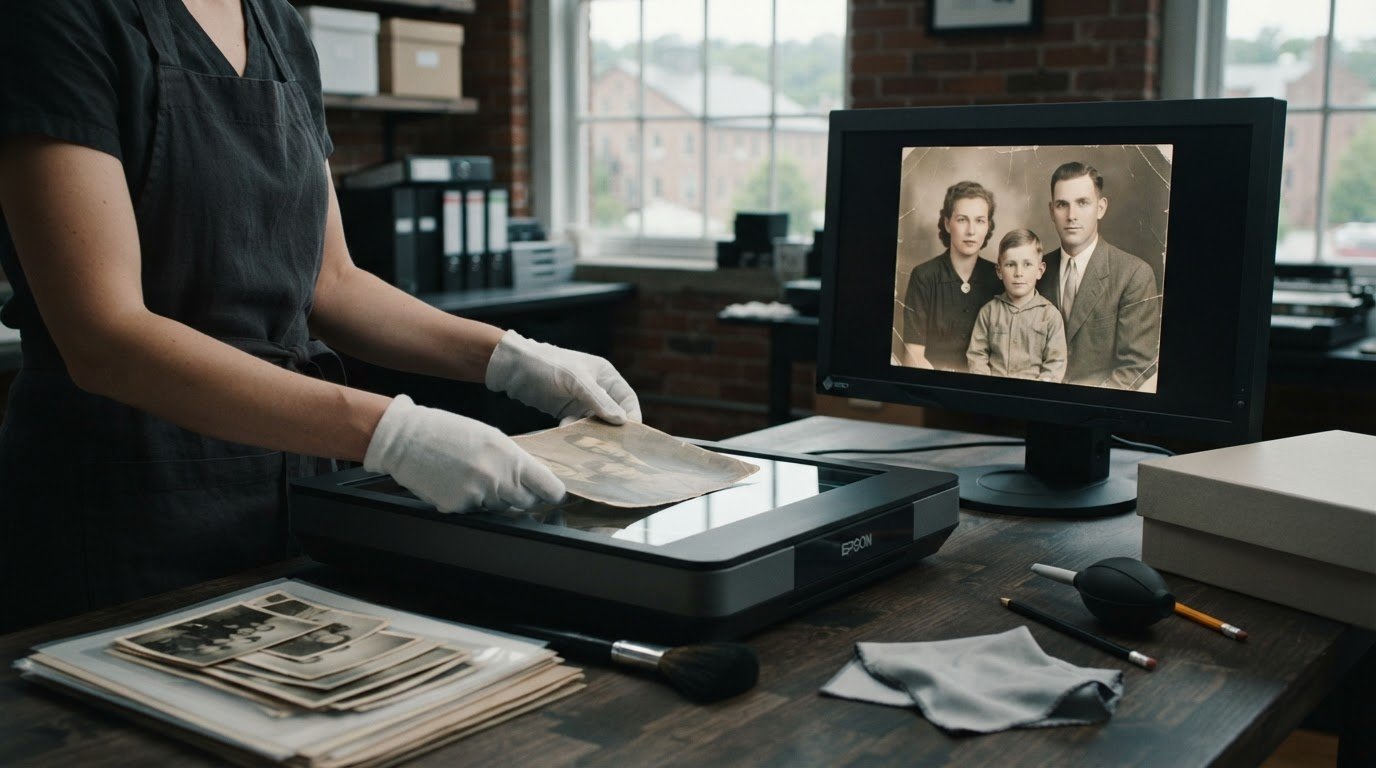
Fragile, oversized, or damaged family photos need handling suited to their condition and dimensions. Forcing a curled vintage photograph flat under a scanner lid can crack or flake its image layer. Separate visibly fragile pieces from sound prints, and note tears, flaking, or unusual sizes before scanning.
A standard workflow can put a damaged original’s surface at risk. Hand scanning allows more deliberate positioning, while oversized pieces may need a capture area suited to their dimensions. Describe each item’s condition and format when arranging a scan so it can be handled appropriately, rather than treated like a standard print.
Scanning time depends on the collection’s size and formats, and whether individual hand scanning is needed. Rush service is a separate shop policy, and local turnaround depends on the workflow and project scope.
Handling curled and warped photos safely
A curled print may look sturdy even when its image surface is brittle. Forcing a vintage photograph flat under a scanner lid can crack or flake its image layer. Keep warped prints separate from flat photographs and flag their condition before scanning. This helps prevent a fragile original from being treated like an ordinary print.
What should you do before scanning? If photographs are in albums, remove them only when they come away easily. Don’t pull attached prints from sticky pages. Sort loose photos into meaningful groups, such as relatives, occasions, or approximate periods, and keep each group in order. Add notes for captions or names that aren’t visible in the image.
- Set aside curled, torn, or flaking prints instead of pressing them beneath books or scanner lids.
- Keep photographs in their original sleeves or album pages when removal could damage them.
- Use separate stacks for prints, slides, and documents to avoid mixing formats.
- Write identifying notes on a separate sheet, not on the photograph itself.
Take particular care where a print bends or its surface lifts. Avoid rubbing the image, smoothing it with your fingers, or using heat and moisture to reshape it. If a family portrait curls at the corners, describe its condition so the scanning process can account for the shape. Scanning can preserve visible detail, but it doesn’t physically repair a damaged original.
Oversized photographs need special preparation. Measure the print and note bent edges, tears, or loose image material before packing it. Don’t force a photograph that cannot lie flat into a smaller sleeve or box. Keep it supported on firm backing during transport, without pressure across the image. Label the backing or container so the print stays identifiable.
For a local project, make a short inventory before bringing or sending a collection for scanning. Include the approximate number of fragile prints, the presence of albums, and any photographs that need special care. This helps distinguish delicate originals from routine batches and keeps family memories organized alongside related videos or written records. To plan capture for valuable or unusually sized originals, review professional photo scanning options as part of your preparation.
Preserving original source material
Scanning creates access copies, not replacements for family prints, negatives, or documents. Preserve the originals after capture and organize the digital backup separately.
Preserving Original Photos
After scanning, return prints, negatives, and documents to protective storage rather than discarding them. Use archival, acid-free folders and boxes for family photographs and paper records. For example, place loose prints in a labeled folder, then store it in an acid-free box. Keep identifying notes with the group, not written directly on an original.
Photo albums need care, too. If a print remains attached to an album page, keep the page intact rather than pulling the image free. Preserve captions and arrangement, which may explain who appears in a photograph or when it was taken. A scan of an individual image may not capture those clues.
Keep originals in a stable, orderly place after scanning. Group materials by family branch, event, or album, and label each container clearly. A folder marked “Smith family reunion” can connect prints with related documents without placing adhesive labels on the photographs. If your archiving project also uncovers commemorative reunion or milestone clothing, Just T-Shirt Quilts can help preserve those sentimental items by transforming them into custom quilts.
Privacy, Backup, and Handling Risks
Privacy, backups, and handling all matter: family images could be exposed, digital files lost, or originals damaged during transport or scanning. Before using a scanning service, understand how images are transferred and who can access them. Protect the originals and keep a separate copy of delivered files.
Back up copies in three places: a computer, an external hard drive, and a cloud service. This reduces reliance on a single device or storage location. After receiving the scanned files, save one copy to a computer, duplicate it to an external drive, then upload another to private cloud storage.
- Keep the original albums and loose prints together with clear labels.
- Use a private account for cloud backups, not a public sharing folder.
- Store the external hard drive separately from the computer.
- Open a sample file from each copy to confirm it’s readable.
For family collections with negatives or fragile prints, make a short inventory before handoff. Note each item’s format and condition, and identify images needing careful handling. This record helps you compare returned originals with the submitted collection and keep every item accounted for.
Digital file delivery by USB, cloud, or CD
Choose delivery based on how you’ll open, share, and preserve the scanned files. A USB drive provides a physical copy, cloud delivery supports online transfer, and a CD offers another removable format. Choose the option that suits your household’s devices and backup routine.
A USB drive is convenient if you want files close at hand. Connect it to a compatible computer, open a few images, and copy the folder to another storage location. For example, save the scans to your computer before sharing selected family portraits with relatives. Keep the drive somewhere safe rather than relying on it as the only copy of precious memories.
Cloud delivery lets you receive files over the internet and download them to your own device. One documented scanning order delivered uploaded files through WeTransfer and a thumb drive, while returning the original materials. After downloading, open several files and confirm the folders contain the expected images. Then make your own backup instead of relying on a transfer link for permanent storage.
A CD may suit families who prefer a physical disc, but you’ll need a device that can read it. Consider where you’ll view the scans and how you’ll copy them elsewhere. If your household computer has no disc drive, for instance, a CD may be less convenient than a USB drive or cloud transfer. A delivery format is useful only if you can access and move its files.
Use this simple sequence when files arrive:
- Open sample images from the USB drive, cloud folder, or CD.
- Check that filenames and folders make sense for your family collection.
- Copy the complete set to a separate backup location.
- Share only the images intended for relatives or other viewers.
Keep originals even after receiving digital copies. A scan makes a treasured print easier to view, but it doesn’t replace the source photograph. Store returned prints and negatives safely, and use digital files for routine viewing or sharing. Before removing files from a temporary download folder, confirm that your backups open correctly. This reduces the risk of deleting the only usable version.
The best delivery option depends on the collection. A small group of portraits may be easy to review on a USB drive, while a larger archive may be simpler to transfer through cloud storage. Choose a format that lets your family open, organize, and back up the scans while keeping the originals accessible.
Digitizing photos from Newburyport
For collections in Amesbury, Salisbury, or Newbury, confirm the handoff and return arrangements. Newburyport archives, libraries, and historical societies may help with research into collections they hold, while scanning privately owned family photographs is a separate task.
Nearby Scanning Service Areas
If your collection is in Amesbury, Salisbury, or Newbury, plan around the handoff location, not distance on a map. Find out whether drop-off, mailing, or another arrangement suits your needs, then pack items according to their formats and condition.
Before arranging transport, make a collection note listing the town, formats, and any fragile items. For example, identify a box of prints and slides separately from an album that should remain intact. This clarifies the handoff and helps keep family images together through return.
Local proximity can make it easier to discuss a project in person, but it doesn’t determine the scanning method. Match the process to the materials: loose prints, film, and delicate originals each need suitable preparation. Keep a copy of your inventory with the collection.
Local Digitization Resources
Newburyport archives, libraries, and historical societies are useful starting points for researching local history and collections they hold. Their historical materials are distinct from privately owned family photographs. Photo scanning creates digital copies of personal originals while keeping the source material with the family.
Use local records to add context to images, rather than assuming an institution can scan privately owned photographs. A street name, family surname, or event written on the back may connect a picture to Newburyport history. Record those clues separately before scanning so the image and its story stay together.
To prepare a Newburyport collection for a local handoff:
- Group prints, slides, negatives, and documents by format.
- Write down names, places, and story details on a separate sheet.
- Mark any oversized or damaged originals for careful handling.
- Keep a simple inventory so returned items can be matched to the collection.
Preserve the context as well as the images. A family portrait may show a familiar face, while a caption or location connects it to a Newburyport story. Keep that information alongside the digital files, and give folders meaningful names rather than vague titles such as “Old Photos.”
When comparing local handoff with mail-in scanning, weigh convenience against how you prefer to transport precious originals. Consider the collection’s formats and condition, and how the service receives and returns materials. A clear plan helps relatives retain the stories behind each image while keeping the originals accounted for.
Image-Tec: Giclee Printing Canvas prints up to 60″ wide & custom Framing
Image-Tec offers BetterLight Scanning for precise digital capture, a useful next step when family originals need careful reproduction. If a scan is destined for display, Giclee Printing can produce canvas prints up to 60 inches wide, with custom framing available to complete the presentation.
Turn to Image-Tec when you want to create a finished print from a digital image or restore a historical photograph. The right path depends on the source material and how you plan to use the result. A scanned portrait for family sharing has different needs from an image prepared for a large canvas display.
Contact Image-Tec to discuss your photo scanning or print project.
Give your family collection a lasting next step
Start by deciding who should be able to enjoy these photographs and which stories should stay attached to them. Ask a relative to help identify unfamiliar faces, places, or occasions. Their recollections can add meaning that an image file alone can’t preserve. A shared naming system also makes photographs easier to revisit together.
If you’re ready to digitize old family photos in Newburyport, start with the collection’s most meaningful or delicate originals. Beginning with a focused group can help shape the project around what matters to your family, whether you’re preserving images for relatives or preparing a favorite portrait for display.
Image-Tec can discuss the next step for your photographs and how its scanning or print services may fit your plans. Start a conversation about your family photos, and take the next step toward keeping their stories close.
Frequently Asked Questions
Why not use mail-in services?
Mail-in scanning can be convenient, but local service lets you discuss unusual originals and hand them over directly. This may suit collections with fragile prints, mixed formats, or handwritten notes that need context. Mail-in box capacity varies with packing and photo sizes, so estimated counts may not fit every collection. Choose based on how you want originals transported and organized, and whether direct communication matters.
What if you can’t remove photos from an album?
Keep attached photographs in the album rather than pulling them free. A brittle or bonded page can tear, lift image material, or lose captions when disturbed. If the album lies open without pressure, a page can be captured as a whole, preserving nearby notes and arrangement. For a thick album that won’t open flat, photograph the page instead of forcing it onto a scanner.
Where can I digitize old family photos in Newburyport, Massachusetts?
Families looking to digitize old family photos in Newburyport can use Image-Tec’s professional photo scanning service. Based in Methuen, Image-Tec serves Newburyport, offering a local option without being located in the city itself. The service suits collections needing professional capture, particularly historic or faded photographs.
Which Newburyport photo shops offer photo scanning services?
Image-Tec provides professional photo scanning from its Methuen studio and serves Newburyport. Its BetterLight scanning system supports high-resolution art reproduction and photo digitization. This is useful when a project goes beyond routine snapshots, such as artwork or historic images requiring detailed capture. The studio is in Methuen, with Newburyport among the areas it serves.
What resolution and file formats should I choose when digitizing old family photos?
Choose resolution according to the intended use: viewing on screens needs less detail than enlarging a print. For reference, full slide-carousel scanning can handle up to 140 slides at 4,000 DPI, with JPEG delivery. JPEG files are convenient for sharing; a TIFF master can retain more image data for later editing. Keep a high-quality master and make smaller copies for everyday use.
How do local photo scanning services compare with mail-in services and DIY scanners?
Local scanning gives you a direct handoff and the opportunity to explain an album’s order or a print’s condition. Mail-in services can suit larger batches when packing and shipping are practical. DIY scanning gives you control over timing, but you’ll handle setup, alignment, and file organization yourself. For a mixed family archive, compare convenience with the care and time each approach requires.







Leave A Comment
You must be logged in to post a comment.