

A photo can be sharp and still look wrong because its colors don’t match the original scene. A digital photo color-correction service in Methuen adjusts color balance, saturation, contrast, shadows, and highlights to create a more natural, consistent image. The right adjustments depend on what needs correcting and how the image will be used.
Color correction isn’t just about making a picture brighter or more vivid. It can reduce unwanted color casts, even out tones, and bring out detail in dark or bright areas while preserving a realistic appearance. For artwork and photographs intended for reproduction, careful color work also helps prepare the image for printing.
This guide explains what color correction can address, how to approach it, and what affects pricing in Methuen. You’ll also learn when professional image services can help and how commercial photography, scanning, and fine-art printing fit into the process.
Key Takeaways
- Color correction can address unwanted color casts and refine tones while keeping an image’s appearance natural.
- Consider how tint, shadows, saturation, and highlights affect the details you want to preserve.
- Per-image pricing depends on the amount of correction needed and the scope of the project, so understand what work the quote covers.
- For images intended for reproduction, connect careful color adjustments with the planned scanning or print process.
What is Photo Color Correction?
Photo color correction adjusts an image’s color and tonal balance to better match its intended appearance. It can reduce a warm indoor cast, restore muted product colors, or reveal detail in shadows. A sound workflow starts by assessing the image and its intended use, then prioritizes changes that keep tones natural.
For a set of images, color matching helps keep backgrounds, skin tones, and product colors consistent. Review the crop, orientation, and composition as well. Straightening a tilted horizon or refining a crop can improve balance without changing the subject.
Per-image pricing depends on the work required, the condition of the source image, and whether a set needs consistent treatment. A basic tonal adjustment is different from detailed color matching or extensive cleanup. Project pricing depends on the scope, so include the image condition, requested edits, and project size when requesting a quote.
Professional editing allows for individual review of an image or coordinated set, while online editing services may rely on standardized tools or presets. The key distinction is how much control and attention the final look receives.
A clear workflow assesses the source, establishes the intended result, and reviews color and composition before delivery. Examples of similar work can help you judge how the editing handles detail and consistency.
Photo correction in Methuen can include color and tone adjustments, straightening, composition refinements, and matching related images. For faded, discolored, or damaged photographs, color correction may improve appearance, while physical damage can call for restoration.
Digital workflows use image files, while physical originals may need scanning. File format and resolution should suit the editing workflow and intended output. Keep the original at its highest available resolution to preserve detail for review and reproduction.
Turnaround depends on image condition, the number of photographs, and the amount of editing required. Any requested timing also depends on workload and scope. Reviews and ratings vary by platform, so assess them alongside examples that demonstrate color accuracy, consistency, and attention to detail.
Tint, shadow, saturation, and highlight adjustment
Color adjustments work together: white balance sets the image’s overall color, while tonal controls shape its light and detail.
White Balance and Tint Adjustments
White balance reduces an unwanted color cast so white areas appear neutral. Warm indoor light, for example, can make a white shirt look yellow; adjusting the balance can restore a more natural appearance. Tint controls shifts between green and magenta, which can affect skin tones and neutral surfaces. Review those areas first, then compare other colors to avoid correcting one object at the expense of the whole image.
Shadow, Highlight, and Exposure Adjustments
Exposure adjusts overall brightness, while shadow and highlight controls target darker and brighter regions. Opening shadows can reveal detail in dark hair or a shaded product; reducing highlights can retain texture in a bright window or pale fabric. Work in sequence: set overall exposure, recover useful shadow and highlight detail, then assess the image’s overall balance.
Contrast separates lighter and darker tones, helping edges and details read clearly. Too much can block up shadows or erase texture in highlights. Sharpening emphasizes edges, but excessive sharpening can look harsh or create visible distortion. Review fine detail at a practical viewing size, especially if the image is intended for print.
Saturation changes the intensity of colors across an image. Vibrance is more selective, often enhancing subdued colors while limiting changes to already vivid areas. A restrained approach keeps skin tones credible and product colors from looking unnaturally intense. Compare the edit with the original to judge whether the adjustment suits the intended look.
For images being prepared for reproduction, fine art print preparation connects color decisions with the final printed result.
For a painting scan, Image-Tec adjusted the overhead lights to get the best light on the painting before scanning it. Once the lighting is addressed, review tint, shadows, saturation, and highlights against the painting’s visible tones. Make restrained adjustments, and reassess the overall image after each change rather than judging one control in isolation.
Color correction service pricing
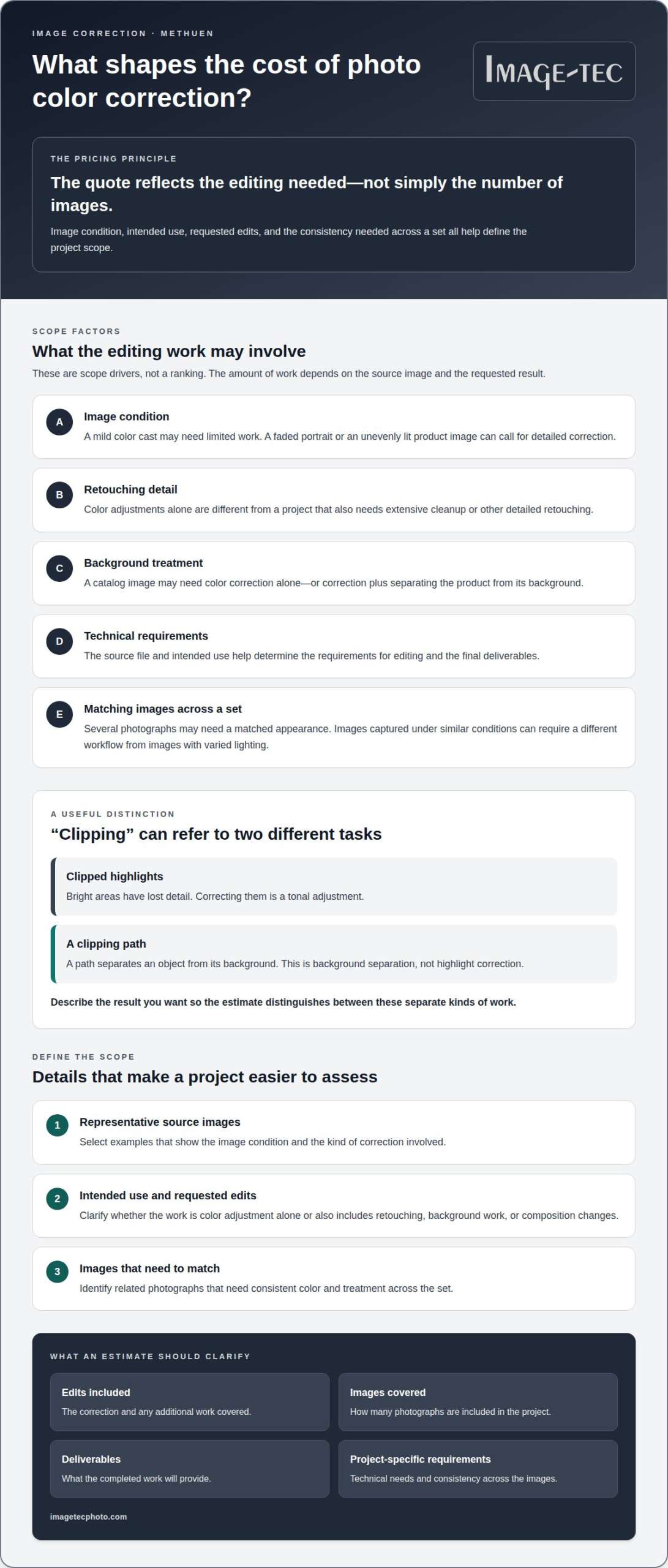
Pricing reflects the editing needed to reach the intended result, not simply the number of images. A mild color cast may need limited work, while a faded portrait or unevenly lit product image can require detailed correction. For a digital photo color correction service in Methuen, the source file, intended use, and consistency needed across a set help define the scope.
Project pricing depends on the requested work and is provided after a quote request. Factors include image condition, retouching detail, background treatment, technical requirements, and whether several photographs need a matched appearance. A coordinated set captured under similar conditions may need a different workflow from images with varied lighting.
Clipping can mean lost detail in bright areas or a path that separates an object from its background. These are different tasks. Correcting clipped highlights is not the same as isolating a product for a clean background, so describe the result you want. A catalog image, for example, may need color correction alone or both correction and background separation.
To define a project’s scope, select representative source images and explain their intended use. Specify whether you need color adjustments alone or additional retouching, background work, or composition changes. For a digital photo color correction service in Methuen, identifying images that must match also clarifies the amount of coordinated editing involved.
A useful estimate describes the included edits and deliverables. It should clarify how many images are covered and whether color correction is separate from additional retouching. For images intended for print, include the planned size and surface in the project details. This context helps determine how to assess color, contrast, and fine detail before delivery.
Exposure, contrast, and saturation correction
Exposure sets the picture’s overall brightness. If a portrait looks dim, a measured adjustment can brighten the face without turning the background gray. A bright window can cause the opposite problem, with pale areas losing texture. Exposure correction balances the image as a whole, then checks important details rather than simply making every area brighter.
Contrast controls the separation between light and dark tones. Increasing it can give a flat product photograph more definition, but too much may crush shadows or erase subtle texture in bright areas. Reducing contrast can soften harsh lighting, though too much makes a picture look washed out. Aim for a tonal range that suits the subject and intended use.
Saturation changes color intensity across the image. A restrained increase may help a dull landscape, while a strong boost can make skin tones or clothing look unnatural. Vibrance offers a more selective way to enhance subdued colors. Compare edits with the original, especially for product images where color should remain faithful to the item.
Apply these controls deliberately: set exposure, refine contrast, then adjust saturation. Review the image at its intended display or print size. Color correction can improve presentation, but it cannot restore detail the source file never captured. Resolution describes the image’s available pixel detail; increasing brightness or saturation does not add missing information. A creative treatment may suit promotional artwork, while a neutral finish may better serve a catalog image.
For a practical review of exposure, tone, and color before reproduction, discuss your image correction needs.
Visuals Clipping describes HDR editing as merging several exposures into one cohesive photograph. Review the result for a unified appearance and a balance that suits the scene. Sharpening and contrast correction can emphasize edges and detail, but excessive sharpening can look harsh or cause edge distortion. Keep adjustments restrained and assess their combined effect with the tonal edits, so added definition supports rather than competes with the subject. A final review helps preserve the intended visual character.
Image-Tec
Image-Tec helps Methuen-area clients make considered color decisions for photographs and images intended for reproduction. When an image needs careful evaluation, color correction can address tonal balance and color consistency; BetterLight Scanning supports precise digital capture of artwork, while Historical Image Restoration can address aging or damaged photographs.
For images moving from digital files to finished artwork, Giclée canvas printing and custom framing connect image preparation with presentation. Commercial Photography also gives businesses a way to create images for professional use. The right approach depends on the source image, its condition, and the intended result.
Contact Image-Tec to discuss your image and the result you want to achieve.
Prepare Your Images for the Next Step
Before choosing a digital photo color correction service in Methuen, decide what the finished image needs to communicate. A family portrait, artwork reproduction, and commercial image may each call for a different visual standard. Identify details that must remain faithful, such as a person’s natural appearance or an artwork’s original colors. That direction gives the editing process a clear purpose.
Think beyond the screen, too. Consider where the image will be viewed or displayed and whether it will be part of a larger project. A defined use helps set priorities for color, detail, and presentation. If you’re unsure how to describe the result you want, bring the image and explain what looks inaccurate or unfinished.
Image-Tec can help you consider the appropriate next step for your photography or artwork. Contact Image-Tec about your photos to discuss your project and move forward with a clear direction.
Frequently Asked Questions
Which local photo labs or studios in Methuen offer digital photo color correction?
Image-Tec is a Methuen studio serving image projects connected to commercial photography and fine-art reproduction. BetterLight Scanning and historical image restoration support artwork and older photographs that need careful digital handling. An artist preparing a reproduction, for example, may need a high-quality digital capture before deciding how the image should look in a finished print.
How much does digital photo color correction cost in Methuen?
Project pricing depends on the image and requested work, and a quote request is needed for an estimate. A simple color adjustment for one image differs from matched treatment across a group or restoration of a damaged photograph. Share the number and condition of the images, their intended use, and any requested retouching so the estimate reflects the project’s scope.
Are there customer reviews or ratings for photo editing services near Methuen?
Reviews and ratings vary by platform. Assess them alongside examples that demonstrate color accuracy, consistency, and attention to detail.







Leave A Comment
You must be logged in to post a comment.